
Design Twitch emotes at the size viewers will actually see. Give each one a single readable reaction, then compare the faces at 28 pixels before investing in detail. A strong mouth shape or pair of eyebrows can carry an expression even after a thin line disappears.
Give each reaction its own silhouette inside the face
Northglass Relay uses the same geometric mask for three reactions. Cheer has raised eyes and a broad curved mouth. Oof has two round eyes and an open oval mouth. Focus puts the emphasis on two heavy brows and a straight mouth. Those differences survive if you switch all three masks to the same colour.
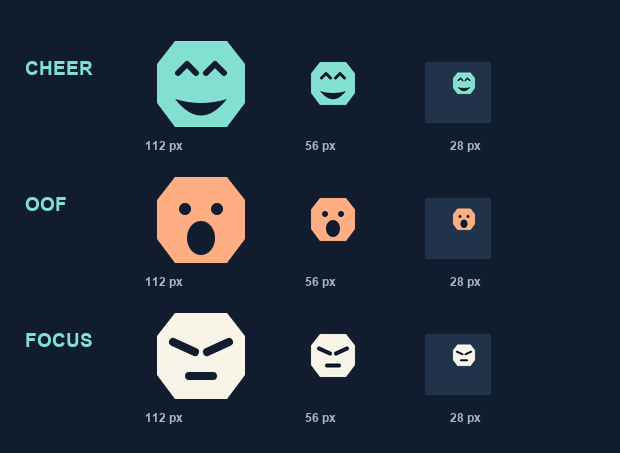
A first Cheer study used narrow facial lines and a tiny exclamation mark. At the smaller size the expression needed that mark to do too much. The revised face widens the eyes and opens the mouth. When your own design shrinks, remove decorative features one by one and rebuild the strongest cue before adding any detail back.
Keep the vector master and make the chat files separately
Use a square artboard with room between the artwork and the edge. Keep the face and expression on separate editable groups, then export a transparent PNG. Twitch’s standard emote formatting guidance describes auto-resize from a single square PNG of 112 × 112 to 4096 × 4096 pixels. Its manual subscriber workflow accepts 28 × 28, 56 × 56 and 112 × 112 versions of the same design and calls for each to be under 100 KB. The workshop files use that manual budget.
Compare the smallest export at 100% on a light and a dark background. Check the empty corners as well as the outside edge, so an accidental filled background is visible. Open each larger export to catch uneven outlines or a changed expression. The included assets are static PNGs. An animated design has a different formatting and motion check.
Check the channel’s emote options before handoff
Review the subscriber emote section for the channel you control. Upload and instant visibility depend on the account’s features, eligibility and review status. Decide which slot the emote is intended for and check that its code and design fit the channel. Keep the source, each export size and who has rights to the artwork together.
Use the same visual cues elsewhere when they help recognition. The stream overlay has room for a wider identity and needs to preserve game information, while the emote has a fraction of that space to communicate a reaction.