Keep the channel name and logo near the centre of a gaming YouTube banner, where they can survive a narrow crop. Let scenery, shapes and colour extend into the outer canvas. Those areas help on larger displays, and losing part of them should leave the channel recognisable.
Start from a canvas YouTube documents
YouTube Help specifies a 2048 × 1152 px upload minimum at 16:9. At that minimum, it gives a 1235 × 338 px safe area for text and logos. It recommends 2560 × 1440 px and limits the file to 6 MB. This example uses the minimum canvas so the documented safe-area dimensions apply directly. Centred on the artboard, the box runs approximately from x406.5 to x1641.5 and y407 to y745.
Create a guide layer and place the important mark, title and any strapline inside it. Give the lettering breathing room within the guide. If the title grows beyond the safe area, try a shorter line or remove the strapline before shrinking the name to the edge. The Northglass Relay example leaves the accent stripes in the area that can crop.
Check what each version still tells the viewer
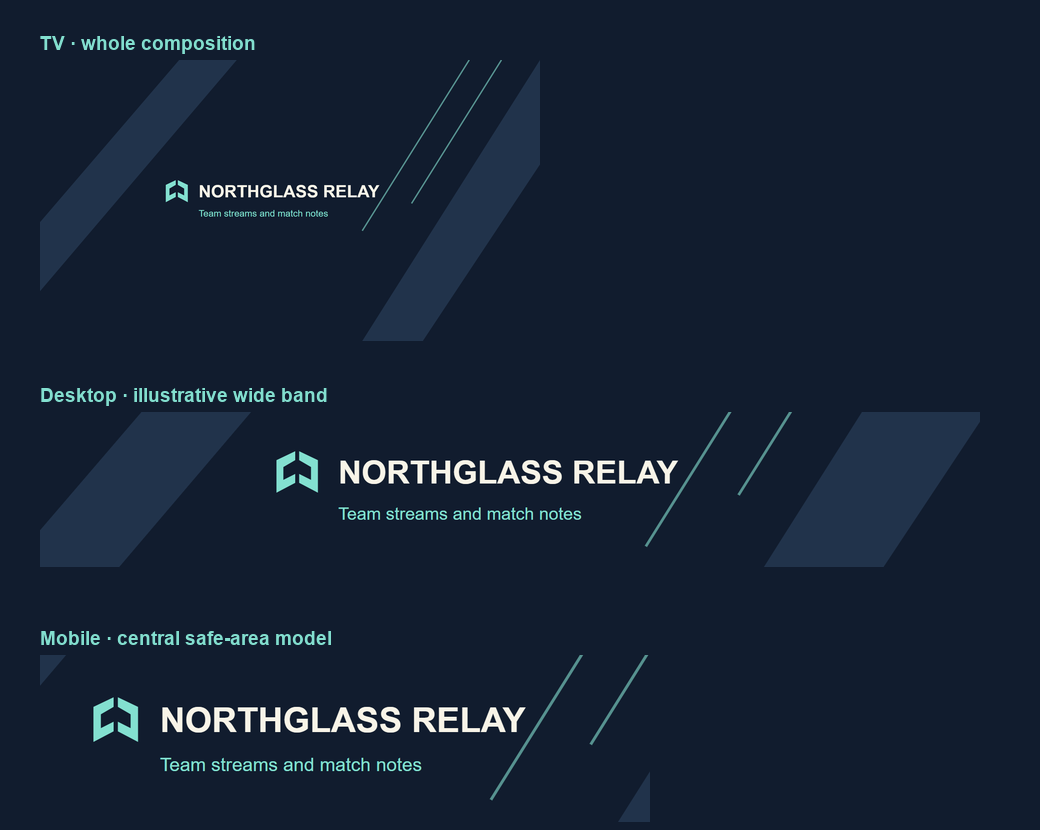
The TV model keeps the whole composition. The wide-band model shows how the background can break at its sides while the name stays intact. The narrow model keeps the central lockup and drops most decoration. An early study put the wordmark near the upper-left edge. The diagonal obscured part of the name even on the full canvas, and the upper-left placement put the name outside the central crop. Move the meaningful content first, then rebuild the decoration around it.
Export a text version and a mark-only version
The workshop files include an editable SVG with the team name and another with only the mark over the background. Use the guide SVG to position replacement artwork and export clean PNGs with the guide hidden. Open the results and compare dimensions and file size, then inspect them at a scale where the text still has to compete with the background.
The workshop master is an SVG. If your team works in Photoshop, use a layered PSD you create for that workflow and keep the guide, background, logo and type on separate layers. Recheck the type bounds after rebuilding them and export the same clean image dimensions. The guide dimensions belong to the canvas used here.
When changing the visual identity, keep the same guide geometry. Test the longest name you expect to use and the fallback when the full wording will not fit. If the profile picture or visible channel name already identifies you, the mark-only version can keep the header quieter. Check the actual device previews in YouTube Studio before saving a banner to a channel.